Visual Timers for ADHD Focus: Why They Work
When Time Feels Invisible
If you have ADHD, you probably know this feeling well. You sit down to work on something. You think maybe twenty minutes have passed. You look up and two hours are gone. Or the opposite happens — you feel like you have been working forever, but it has only been five minutes. Time feels slippery and hard to hold onto.
This is not a personal failing. Many people with ADHD experience something called time blindness. The brain has trouble sensing how much time has passed or how much is left. Regular clocks and timers with numbers can help a little, but they do not always give your brain the signal it needs to stay on track.
That is where visual timers come in. They turn time into something you can actually see, and for a lot of people with ADHD, that makes a huge difference.
What Is a Visual Timer?
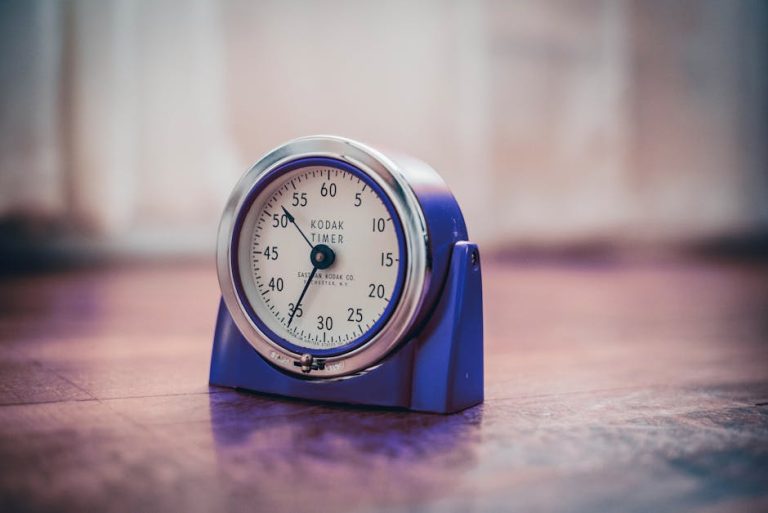
A visual timer shows time passing as a changing image rather than just numbers. The most common type shows a colored disc or bar that slowly shrinks as time runs out. Instead of reading a number like “14:32,” you see a big chunk of color getting smaller. When the color is almost gone, your time is almost gone.
You can find visual timers as physical devices, apps on your phone, or tools built into focus apps. They come in lots of styles — some look like a simple circle, others use filling bars or countdown animations. The key feature is the same in all of them: time becomes a visual object your eyes can track without effort.
This matters because the brain processes visual information very quickly. You do not have to think about what “14 minutes” means. You just see the color and know where you stand. That instant understanding is what makes these tools so helpful for ADHD brains.
Why the ADHD Brain Responds to Visual Cues
ADHD affects how the brain manages attention and impulse control. One big piece of that is working memory — the mental space where you hold information while you use it. Keeping track of time in your head takes up working memory. When your working memory is already stretched thin, tracking invisible time becomes very hard.
Visual timers take the job of time-tracking out of your head and put it in front of your eyes. You do not have to remember to check the clock. You do not have to calculate how much time is left. The information is just there, updating on its own. That frees up mental energy for the actual task you are trying to do.
There is also something motivating about watching time visually. Seeing that colored section shrink can create a gentle sense of urgency without panic. It gives your brain a concrete, real-time signal that helps you stay anchored to the present moment instead of drifting away.
How to Use Visual Timers Effectively
The most popular method is something called the Pomodoro Technique. You set a timer for 25 minutes of focused work, then take a 5-minute break. After four rounds, you take a longer break. With a visual timer, you can see exactly how much of that 25-minute block is left without interrupting your focus to check.
You do not have to follow a strict system though. Some people prefer shorter blocks of 10 or 15 minutes, especially for tasks that feel really hard to start. Others like longer blocks of 45 minutes or more when they are in a good flow. The point is to pick a chunk of time that feels manageable and make it visible.
- Start small: Try 10 or 15 minutes if longer sessions feel overwhelming.
- Place the timer where you can see it: Keep it in your line of sight without it being distracting.
- Use it for breaks too: A visual timer for your break helps you actually come back when the break is over.
- Be consistent: Using a visual timer regularly helps train your brain to expect focused work periods.
Apps like Gaveki include built-in visual focus timers designed specifically with ADHD users in mind. Having your timer inside a focus app can help reduce the number of tools you need to manage, which is one less thing to think about.
Visual Timers vs. Regular Timers and Alarms
Regular alarms tell you when time is up, but they do not show you time passing. That means you still have to estimate where you are in the middle of a work block. That estimation is exactly the part that is hard for ADHD brains. You might feel like you just started when actually you are halfway through. Or you might feel exhausted and ready to stop when you have barely begun.
Plain number timers are a step better because at least you can check them. But checking requires a deliberate action — you have to stop, look, read, and process the number. A visual timer removes all of that friction. A quick glance tells you everything you need to know instantly.
Alarms also create a startle response when they go off suddenly. That jarring interruption can be frustrating and throw you out of a good flow. Visual timers let you see the end coming, so the transition feels gentler and more predictable.
Finding the Right Timer for You
There is no single timer that works best for everyone. Some people love physical timers they can put on their desk because they do not require a screen. Others prefer app-based timers because they are always nearby. You might want to try a few options before settling on one.
When choosing a visual timer, look for something simple and easy to read at a glance. Complicated designs or lots of buttons can add friction and make it harder to actually use the tool. The simpler it is to set and see, the more likely you are to reach for it every time you sit down to work.
If you want a focused digital option, the Gaveki app combines a visual timer with other ADHD-friendly focus features in one place. Trying different tools and noticing what feels right for your brain is part of building a system that actually works for you.
You Deserve Tools That Work With Your Brain
ADHD does not mean you are lazy or bad at managing time. It means your brain needs different support than what most standard tools offer. Visual timers are a simple, practical way to give your brain the information it needs in a format it can actually use.
Start small. Pick one task today and set a visual timer for it. Notice how it feels to see time rather than just guess at it. Small changes like this can add up to real improvements in how you focus and feel throughout the day. You have got this.
🧠 Tools That Actually Help ADHD Adults
Free ADHD Focus App
Noise Cancelling Headphones
Visual Timer for ADHD
Amazon links are affiliate links. We may earn a commission at no extra cost to you.